Showing posts with label Blogger Tips. Show all posts

Blog Auto Generator Content

Blog Auto Generator Content - Recently my friend a scene in his Facebook status. Beep status:

".... Just make the article itself, uh directly in Copas all q. article. This is not my blog ... haduh mas or mbak .. mbak or mas gmn ya? "

It is now a battle going on between Google and AGC, aka Auto Generate Blog Content and autoblog. But it did not dampen the AGC-er and Autoblogger to menginofasi AGC system and Autoblog them to be able to conquer the Oracle search engine: Google.

But Google still is Google, which only rely on the ability to record various Clawlernya Robot queries, information and other data, and certainly not as sophisticated human brain has a sense, the heart and the ability to analyze more than Robot Clawler SE was designed from the human mind.

War Between Google VS Autoblog AGC-AGC seems to still be won with still buanyaaaaaaaaaaakkknya party sites that use Autoblog AGC and a respectable position in the Search Result Page. And worse, still too many sites or blogs that become victims of atrocities AGC (dicopas article as my friend on FB status above)
tips and tricks to face autoblog and AGC

However, there are several ways that we can use to fend off an attack AGC for us the owners of sites and blogs, at least for not too severe in our position as victims of oppression AGC and Autoblog.

Here are a few little tricks and tips to avoid self-victimized AGC and Autoblog:

Turn off your site feeds. Site feed is the mainstay for the Autoblogger to suck content from other sites. If your blogspot or blogger platform users, simply minimalisirkan feed of your blog. If you feel you want more secure, as well as non-switch feeds to your blog.
Include links in your articles. It's one surefire way mensiasati Autoblog delinquency, with embed links in the article, although the article or content is aspirated autoblog, will give a double benefit for you, ie: your blog will get free backlinks, and google will better understand the source of the beginning of the article originally.
Strengthen the position of your domain. Domain powerful, though in Black and in copy-paste-out by the AGC and Autoblog, but a position in the SERP, your blog will be stronger than AGC and autoblog itself. The role of SEO is very important here.

Those are some tips on light, though it does not mean it will alienate autoblog and AGC from our site, but can at least minimize cruelty and Autoblog AGC
Selengkapnya →

Beware of Blog Duplicate Content Berprogram Duplicator

Beware of Blog Duplicate Content Berprogram Duplicator - What is Duplicate Content? Before that, I will explain briefly about what it is Blog Duplicate Content. Blogs duplicate content is a blog that will duplicate or mengandakan an article into other blogs (short blog to Copas article automatically). Usually blog duplicate content article content is only half and never clear. It also always takes the visitor to a link that is misleading.

So what is Blog Berprogram Duplicator Duplicate Content?
I myself do not know what to call this what terms. Therefore, I call it Blog Duplicate Content Berprogram Duplicator. Looks like duplicate content is a new system that uses a more sophisticated program. The article in the duplication is not only half, but really the whole of your article. It also links that are directed not misleading duplicate content like blogs in general. Also Berprogram Duplicator Blog Duplicate Content will immediately and simultaneously copied automatically when you publish the article.

How Google Responding to Blog Duplicate Content?
Actually it does not matter if our blog on duplication, because google really hate the blog Duplicate Content or blog copy and paste. In addition, Google also has a system that is able to record the activity of the sites listed in google. So google will know in advance which pages are indexed by google. So blogs that contain duplicate content would be banned sooner or later.

How to Blog Duplicate Content Berprogram Duplicator work?
Because Blog Duplicate Content Berprogram Duplicator tracings simultaneously shortly after we publish an article, then chances are google index the first blog from our blog to be larger. So that could be mistaken for tracing your blog article by google.

Is Blog This Also Have Become Victims?
If the question whether this blog has also been a victim Berprogram Duplicator Blog Duplicate Content? Of course ever. Some articles I have in duplicate by the website address at www.hi-techmall.org. no half-hearted, every article in copasnya directly located on the first position google SERP. While my articles are always underneath.

So is there any downside?
Of course, every thing in this world no one is ever perfect and must have no weaknesses. Likewise with Berprogram Duplicator Blog Duplicate Content. Because this blog is 100% duplicate articles without a bit less, then each link in the article we will definitely participate tercopy. Therefore, you should also leave the links pointing to your blog so you do not really harmed. And you will also get a free backlink.

How to Overcome Berprogram Duplicator Blog Duplicate Content?
I never report my blog that duplicate articles into google. and the result, Blogs Duplicator Duplicate Content Berprogram this stop duplicating my blog. In addition, the article I have ever in duplikasinya also deleted from the blog. And I end can sleep in peace. Then how do I report it to google? Read my article on ... ... ... ... .... How to Report SPAM to Google Blog
Selengkapnya →

How to Easily Know Total Links Within Pages Blog

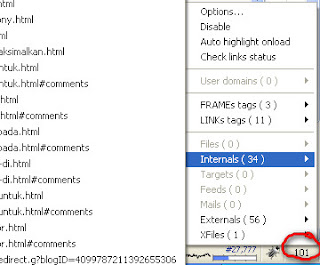
How to Easily Know Total Links In Home Blog - Obviously still fresh diingatan you about Blog Tips-Tricks edition of Friday, August 13, 2010 about the dangers of installing a lot of links in the blog page (Read: SEO: Do Too Many Links In Home Blog). We recommended that you should not put more than 100 links on a blog page. So how do I know how many links in a blog page? Because of course it is impossible to count them one by one. Therefore, in blog tips-tricks this edition I will give a solution of this problem.

Simple Link Counter is one of Firefox's Add-Ons that serves to calculate the number of links on a web page that is being opened. With these add-ons, you can easily find out how many links contained in your blog page. To install it, perform the steps below.

1. Go to Simple Link Counters
2. Click the "add to Firefox" and do the installation through to completion
Image and video hosting by TinyPic
3. When finished, restart your Firefox.
add-ons
4. Once installed, then each time you open a blog page, you will see the number of links on the blog page at the bottom of Firefox browser
Selengkapnya →

How TO Indexed in Google Quickly?

How TO Indexed in Google Quickly? - Connecting posting yesterday that I will post tips on how to blog indexed faster in google. Obviously these tips are not one hundred percent guarantee that your blog will be indexed faster, but so-so for the try and I have proved this fact alone the truth.

As a last statement, that after we sign up on google, our blog is not directly indexed on google search engine, but it could take 3 to 4 weeks even if fared less well able to 8 weeks before our blog terlisting on its search engine. Well that is not too tired of waiting, a few tips for my friend, please try and prove.

* Fix blog settings

For step-by-step setting (Settings) blog, complete already please read my post here!, But because the post was made before any service Indonesian-language bloggers, then settingannya speak english. But anyway I am sure that my friend would understand what I wrote.

* Links to blogs with high page rank

One way for our blog indexed faster in google is that we are linked by blogs that have a high page rank, and usually these blogs are well-known blogs. Examples of Indonesia, which is very popular blog is his blog mas fatih http://fatihsyuhud.com syuhud namely, blogs kang Agus hery in http://edittag.blogspot.com, and much more. My advice beforehand attach their blog link on my friend's blog page, and then ask for your blog at the link linkback or behind by them. Demand for the linkback can be submitted on the guest book (shoutbox) or can be via a comment on the post or if you want more personal to send via email. I am sure they will soon put a link on their blog buddies, or if within three days is still not in the linkback, proposed back demand for dilinkback due to well-known blogs in a day not just one or two blogs that put their blog links, then only natural if there is one or two blogs that overlooked for the linkback.
Selengkapnya →

What Can Be Done Not Google's URL Removal Tool

What Can Be Done Not Google's URL Removal Tool - We apologize for the limitations of my analysis of Google about cleaning links in webmaster tools. There are some things in Moscow, Susan answered, Webmaster Trends Analyst, Google about the eraser tool links in webmaster tools. Some time ago I menposting about dynamic page view bloggers (read: Blogger Dynamic Views Duplicat Tags), and apparently it will not give a meaningful impact. But, do not then you are confused because you have to do deletion as I do. Abolition was not a devastating effect, but also did not provide other positive effects, well to say it's useless.

Here are some things to be said Susan Moscow, related to anything that can not be dealt with removal links in webmaster tools.

To Membrsihakn cruft, like an old page that was detected as 404.
Which includes old page is a page from your blog that you've probably had to delete. Suppose you are aware of articles that are less good and is not feasible and you delete it. When there are reports not found a link in webmaster tools, then you do not have to remove it because Google will adjust itself. Removal links are designed to remove the broken links that are urgent as terkenanya malware.

To Clean Crawl Errors from your Webmaster Tools
Once again sorry for my limitations, as in my previous article titled: Clean Link Not Found in Webmaster Tools. In the article I suggest you to remove any broken links from your article. And for those of you who already deleted do not worry because it is not bad for you. Only when we remove a broken link from our blog, we like doing things in vain because of the elimination of it may take up to 90 days, equal to the time required by Google to automatically detect and remove broken links from your blog.

Start Again From Zero To Your Site
Maybe you fear that your blog exposed to penalty or punishment and then you want to start from zero again. Or for you who just bralih domain. Suppose your original address in blogspot.com, then you switch to. Com. Google does not ever suggest that you remove your blogspot.com link through the Link Removal Google. The same thing happens when your old blog address has a bad history, for example you use to distribute adult content or other inappropriate content, you can not remove it through the removal of links from google.

To Vote or patenting URL What You Like
Some of you often hear about the issue of www and non www. Some choose to patent their website address www equipped, and some choose not to display the www. Well, be careful because of the elimination of one of the URLs, eg http://alamatblog.com/pages1.html it also will remove also the page with the www, namely http://www.alamatblog.com/pages1.html as well as security page ie https: / / alamatblog.com/pages1.html.

In essence, this tool can only help you in emergency situations, when your blog exposed to malware and the like.

Hopefully this fix for this misunderstanding about the removal of links, and for those who really want to use it please visit the new Google removal tools at https: / / www.google.com / webmasters / tools / removals.

If you find many reports of crawl errors in webmaster tools, Google is going to clean it regularly ... Greetings fresh .
Selengkapnya →

Pengertian atau Perbedaan Blog Dofollow dan Nofollow

Understanding Nofollow From wikipedia nofollow defined:
nofollow is an HTML attribute value used to instruct some search engines that a hyperlink should not influence the ranking of the target link in the search engine's index. This is intended to reduce the effectiveness of several types of search engine spam, thereby increasing the quality of search engine results and preventing spamdexing from happening.
Simply put, when you use the nofollow link means that when search engines access and page through that link, he will not further explore these links. Because not traced any further, then the link does not affect the number of backlinks and also does not affect the rating.

Understanding Dofollow
You do not find dofollow on wikipedia? Should you need to know, because actually there is no tag dofollow. This is just a term to distinguish with nofollow links. When you let your links dofollow, so when search engines read your page and find the link, he will further explore these links so that search engines produce a report, in this case relates to the number of backlinks and ranking consideration.

Writing Nofollow
When you add a link to your post, then the link automatically printed as a dofollow link. To change this, please write as follows:

name link
Not Found Writing For Rel = Dofollow
As I wrote above, is not actually a rail dofollow. It's just a term to distinguish it with nofollow links. Therefore there is no writing for dofollow links. Written without a rail link has meant that dofollow nofollow.
name link

The addition of rel = dofollow on the link, such as the following is useless.
name link
So, for example when you try to spam blog comments forced on others by adding dofollow, then it is in vain. Read the full post on the Blog Squire in the article entitled The Spam Techniques In vain.

Why this Blog Nofollow?
Blog with a lot of articles would be more difficult to manage every post even every comment. A blog comment section is not set nofollow, will be very dangerous, because it could have planted a lot in the comments box broken link or linking forbidden. Not to mention the kings of spam that insert a lot of the same link on one page. This could worsen the SEO, or the worst possibility is kicked Google's Blog ...

A little info about dofollow and nofollow ... Hopefully helpful, we discuss more in later ... For those who have more info or article more about This could leave through the comments in this article ...
Selengkapnya →

blogdoodey.blogspot.com di hapus goolge

blogdoodey.blogspot.com di hapus goolge. Apa GErangan?
Selengkapnya →

Create a blog on Facebook

Create a blog on Facebook - Facebook is not available in the official feature to create a blog. But thanks to an application made by the users of Facebook, there are some applications that are ready to blog you can use in creating a blog in your Facebook. If you want to create a blog on Facebook or fraudulent want to create a blog follow the steps below.

Step 1:
In keaadaan you have logged in into your account up for you, try to enter a keyword / keyword "blog" on the blog search to find applications that are available.

Step 2:
You will see several blog applications created by third parties. This time, choose one that is made by Shujaat bin Tariq with a blue B icon, and click the View Application.

Step 3:
Next will come the main page of the blog application. Click Go Application.

Step 4:
Then you'll get a few blogs that have been in publishkan by other Facebook users with the same application as well. On this page there are also links to make your first blog. Click the Create New Blog Entry.


Step 5:
Before you can create a new blog entry, you must activate the blog face. Click Add Face Blog

Step 6:
On the next page you will be prompted for confirmation to allow access to the display profile and everything related to your personal data on Facebook. Click Allow

Step 7:
You'll find re-display the same page dengans ebelumnya. Click the Create New Blog Entry

Step 8:
A good idea to create a category in advance to make your blog become more neatly under different topics that you created. Click Add New Category

Step 9:
In the Add New Category dialog, specify a name for that category on the Title. Description To provide a brief explanation menenai category, or you can also let in keaadaan empty but it's good on the content first.

Step 10:
A moment later a new category that you created is now listed in your blog.

Step 11:
You can make some other categories in the same way. If so then later in the Categories will appear the names of the categories you have created earlier. This time you are able to create a blog entry by clicking the Create New Blog Entry.

Step 12:
Actually for the application of artificial blogs shujaat bin Tariq has fitir WYSIWYG editor, but when the article was in the high rises were still there are improvements. Therefore, this time not unlike tampilanya Basic Editor. Enter namajudul on the title and select the category you want to use.

Step 13:
You can enter your blog posts in the section that has been provided. unfortunately this time fitue WYSIWYG editor is still not perfect. But you can include links videos from YouTube here.

Step 14:
To insert a video from Youtube, search videos you are looking for using the search facility on Youtube. Once you find the video search results, click one you want, then copy the URL of the video and input video URL that you get from earlier in part Youtube Video URL.

Step 15:
After all believed had been filled with the tone right click Publish. Then you will get a message that your blog has been completed is made.

What do you think? Are you also will create a blog on up like me?
Selengkapnya →

Guide how to change the layout of Facebook

Guide how to change the layout of Facebook - facebook images Guide to alter the layout of Facebook

Dear Friends already have an account up? If not please read the guide how to create your account up here. For new friends who have a facebook account tapibelum know how to change the layout up, please read the guide below. In contrast to the easy layout in Friendster layout changed its color, its layout Fesbook not easily replaced. Why? because sites worried fesbook will display layout up made by its users ugly. But not to worry, there is now a FB application that can change the look of our facebook layout. Want to know how it?

Steps to change the layout / Background up

Application to change the layout of up named Yantoo Layers. It is they who provide cool facebook layouts that can be used as background Fesbook us. Okay, please follow the steps below.

Log into Facebook Account
Please click the link applications up Layout PageRage
Click "Allow" when asked for permission. That application is seeking permission to us to use the profile data needed to be run properly.
Later will come set up for cool layouts that can be used as background Fesbook us. Please look for it to taste cool layout wink icon Guide to alter the layout of Facebook
Then click on the image layout up that you like, will be asked to install Yantoo Layers if you have never installed it. Follow the installation steps correctly Yantoo Layers to complete. Once installed, the layout options will be installed.

To note:
All I can see the layout change was OWNERS facebuk account only. To be friends you can also see the changes, Invite them to use the application above and have installed the add on Yantoo Layers
Until now, add on Yantoo Layers only supports Mozilla Firefox and Internet Explorer. For other browsers still do not.

How? easily change the look of the layout of Facebook is not it? Please be practiced in each Account Facebuk yes, hehehe biggrin icon Guide to alter the layout of Facebook
Selengkapnya →

Guide how to make your WordPress blog for free

wordpressbackup thumb Panduan cara membuat blog WordPress gratis

Guide how to make your WordPress blog for free - Want to have a blog but confused what to use blog platform which? I recommend wordpress.com blog. Why? Because in addition to free, WordPress is the most easy to use for beginners, even not need to touch the HTML code and PHP! Want? Please follow the guidelines create a free wordpress blog below.
Step WordPress.com blog creation
Okay, first go to the website http://wordpress.com/ or Indonesian version of his in http://id.wordpress.com/, then click tombolbesar Sign Up Now, after the click on the page that appears is charging biodata page.
Please fill in the Username and Password as you wish. Then on the form an email address, please fill in the email address is still active. Do not have email? please follow the guide here how to create email icon wink Guide how to make your WordPress blog for free. Then tick the legal form that you agree to the TOS Flotsoam WordPres. Finally, click on "Gimme a blog!" And then press the Next button.
Now on this next page you are prompted to enter data from blogs created. On Blog Domain, enter the name that will be the URL address of the blog. For example, enter the domain blog my blog, then later com your WordPress blog URL so http://blogku.wordpress.com. Then on the Blog Title, content with the title / name of your blog. In the Language section, select the language of the blog, in this case select the Indonesian language. Finally tick the little box on the Privacy and press the Next button.
Congratulations, the blog is finished. But unfortunately the blog has not been confirmed. immediately open the email that was used to register, go to the email sent WP.com, then click the confirmation link. Blog you've confirmed and ready for use.

YOU Must Know about WP.COM

WordPress Blog is not a free version can be fitted Advertising, be it PPC, Paid Reviews, Text Link or other Monetasi way. If the violation can be equal to the authorities shut down his blog icon biggrin Guide how to make your WordPress blog for free.
Themes and Plugins limited available. But not to worry, anyway its cool cool Theme kok.
WP.com blogs can also be Custom Domain, please read the Premium Services for more information.
For those of you who want
to enjoy all the amenities and sophistication WordPres as free as free, use WordPress.org. Fixed tis tis free, we only have to provide their own hosting and domain. If you want to buy a domain, please buy a domain in Godadday.

A few guidelines to make free wordpress blogs, may be useful to his friends in need. If there are mistakes please forgive and if you have any questions, do not hesitate hesitate to ask via the comments form below. Happy Blogging!
Selengkapnya →

interesting secret blog visitors

interesting secret blog visitors - Tricks Increase Blog Traffic Visit - If you read the title of this article you probably think "like I would get a powerful tricks to increase traffic blog traffic. " But excuse me what would I write is not a remarkable trick that even limited curhatan well as answers to questions my friends who joined the group on facebook Info Regarding the Internet.

Some friends asked, why a blog post from late-akhri tenriewa.co.cc this impression out of material?
Or there is a rather critical end-postingannya just say this akhit impressed "sorry" not quality.
That question is even though it sounded a bit condescending, but for me it is the sort of questions that aim to motivate me to continue working better. And I must confess that as this is the fact that my blog now.

Not intended to defend, but there certainly should be no answer questions.
At the beginning of my blogging via mobile phone even though I have the determination to publish an article that does not exist in search engines or even an article that does not exist in this universe (not just on the internet).

Since that time I was blogging using mobile phones fully proves the articles that I made ​​at that time did not exist in the search engines about some tricks in mobile blogging. Before I made the article so I will Seacrh first.

So why now instead lifted the titles common?
Actually this is the intent of the title of this article is to increase visitor traffic. If we do not make the articles more commonly found on search engines it will be difficult to get high traffic.

Why is that?
Because the flow of Indonesian bloggers are like this, so inevitably we have to go along to compete.
Flow is what I mean by the term "shoot Keyword".
Apapaun who became the hot topic will be published by the blogger does not care about the article is far from the theme of the blog itself.

If the count is very rare Indonesian bloggers who have a niche content.
So when asked why this blog published an article that his impression of quality not the answer.

"I feel obliged to complete a common article of this blog to participate get a share of the search engines. But every article I will suguhi with my own-made articles or at least based on my own experience."
Selengkapnya →

7 Ways to Bring visitors to your site


7 Ways to Bring visitors to your site - If you want memoneytisasi blog, play in online business or internet marketing, bringing in visitors as much as possible is a way to be done. Not only visitors carelessly, teetapi targeted visitors, who according to the keywords that you seek. Here are 7 ways to mendatangkn targeted visitors to your site.

1. A very effective and efficient is through Google Adwords, by way of pay per click advertising is clear you will get traffic / visitors who fit your target.

2. write good articles from article directories or even become a guest blogger on the blog your partnership or it could be in your own blog and obviously you can promote these products, if the content of the article is very useful for them, then they too will be happy to visit your website constantly without being asked.

7 Cara Mendatangkan pengunjung ke Situs Anda3. contact the blogger for mutual cooperation to exchange links, or even each other to promote their products - their blog visitors.

4. to each other bloggers give comment to other blogs in the hope they will reply to comments too on your blog. For the internet marketer could have joined Clickbank or PayDotCom for the affiliate marketers can promote sales pagenya.

5. always build a good email list in your blog or sales page that match your product or topic in your blog, this way you can begin to sell products that genuinely interest your visitors, search and find the autoresponder that you like, if your funds mempet then you can try the service freeautobot.com

6. build community through the forum - a forum that fit your target market, help them from the problems that exist, the more you help the higher your reputation, they too will be happy to visit your website that has been inserted in the signature forum.
7. The most I liked, which you can start optimizing your blog or website so they can get the best place in the google search engine by learning SEO, the higher your position in search engines the higher the visits to your website or blog.

7 Ways to Bring visitors to your site - But certainly not the only 7 ways you can do, develop other methods you can learn yourself and always be disciplined in carrying out the method.
Selengkapnya →

how chek your blog is loading with WebWait

how chek your blog is loading with WebWait - WebWait is a free tool what checks the loading speed of a website or blog. The loading time is depending on many factors, like the speed of your host. If you have hosted your blog on blogger you can improve the host speed only by buying a faster host, but don`t worry , are many free ways, too. First check the loading speed of your blog, to check it just go to WebWait.com and type in your blog URL and click on the Time it! button.
webwait website loading timeThe average loading time of my blog is 2.12. This is a good loading time , try to keep your loading time bellow 5s. You can improve the loading speed by removing some unnecessary gadgets and plugins. Use small images , don`t use large images scaled to a small size. Try to use a simple color as background or create a very small image and use the repeat tags. With this tool you can set the number of trials and the time between the checks. This tool shows the result of each individual check, too.
Selengkapnya →

Free Backlinks Website

Free Backlinks Website Here ini:
Free BacklinksMariachi Backlink ExchangeKostenlose Backlink AustauschMultiple BacklinksLinki Linki Free BacklinksFree Automatic Link
Dr.5z5 Open Feed DirectoryBelajar Bisnis Internet | Teknik Bisnis Internet | Website Bisnis Acehsaya Backlink ExchangebacklinkFree Automatic LinkFree Backlinks ExchangeFree Automatic LinkFree Automatic LinkMultiple BacklinksFree BacklinksFree Automatic LinkBacklink Exchange - PlugboardPlugboard ManiaFree Automatic LinkCárdenas.netFree BacklinksDAHOAM Free BacklinksLinki Linki Free BacklinksECBannerDie Gute SaatFree Automatic LinkDie Gute SaatFree Backlinks Exchangekostenlose backlinksFree Automatic Link echange de liensFree Automatic LinkIntercambio de enlacesFree Automatic LinkFree Automatic LinkFree Automatic LinkFree Automatic Elvira LinksFree Automatic LinkFree Automatic Link Intercambio gratis de EnlacesFree BacklinksFree BacklinksFree BacklinksFree BacklinksEnlaces GratisUnlimited Backlink ExchangeUnlimited Backlink ExchangeFree BacklinksTradiciones Peruanas de Ricardo PalmaAutomatic Backlink ExchangeFree Automatic LinkFlorists Linkstrafic backlinks Free Automatic BacklinkFree Automatic Backlink Kostenlose Backlink AustauschTukeran Link | Backlink | Link ExchangeFree Automatic LinkFree Automatic LinkWeb Link ExchangeText Backlink ExchangesSoqoo Link ExchangeText Back Link ExchangeText Back Links ExchangeText Back Links ExchangesOverShopping Link ExchangeAllNewsSite Link Exchange

Selengkapnya →
Blogspot Tips And Tricks © 2011 Template by:
SkinCorner